computer free courses MS Word , MS Excel , MS Access, InPage , Corel Draw , Windows Installation.

Sunday, June 24, 2018

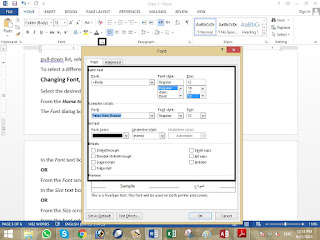
Changing Font Size and Color Dialog box Option

Changing Font Size and Color Dialog box Option
Select the desired text
Changing Font Size and Color Dialog box Option


From the Home tab, in the Font group, click Font
The Font dialog box appears.
In the Font text box, type the desired font name
OR
From the Font scroll list, select the desired font
In the Size text box, type the desired font size
OR
From the Size scroll list, select the desired size
From the Font color pull-down list, select the desired font color
In the Effects section, select any additional font effects
EXAMPLES: Small caps, Superscript, Subscript

Click OK


If my posts are useful for you، or if there is any reduction in them so kindly comment me.

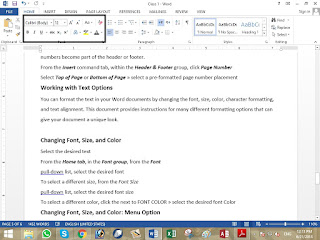
Changing Font Size and Color menu option

Changing Font, Size, and Color menu option

Select the desired text
Changing Font Size and Color menu option


From the Home tab, in the Font group, from the Font
pull-down list, select the desired font
To select a different size, from the Font Size
pull-down list, select the desired font size

To select a different color, click the next to FONT COLOR » select the desired font Color


If my posts are useful for you، or if there is any reduction in them so kindly comment me.
Printing the Active Worksheet or Entire Workbook in MS Excel

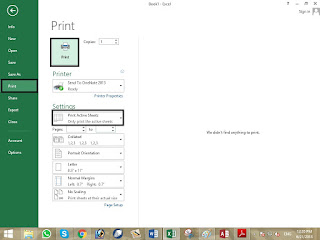
Printing the Active Worksheet or Entire Workbook

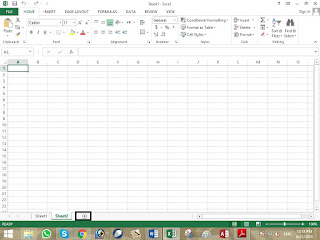
To activate the worksheet you want printed, click the tab of that worksheet
The worksheet is active.
Printing the Active Worksheet or Entire Workbook in MS Excel


In the top left corner of the Excel window, click the OFFICE BUTTON» select Print
OR
Press [Ctrl] + [P]
The Print dialog box appears.
In the Print what section, select Active sheet(s). Print all the worksheets then
select Entire Workbook.
Click PRINT

The active worksheets are printed.


If my posts are useful for you، or if there is any reduction in them so kindly comment me.

Inserting Worksheets in MS Excel

Inserting Worksheets

New Excel workbooks are created automatically with three worksheets. If you need

additional sheets, you can easily insert them.
Inserting Worksheets in MS Excel


If my posts are useful for you، or if there is any reduction in them so kindly comment me.